
Stop Letting Link Rot Kill Your Channel
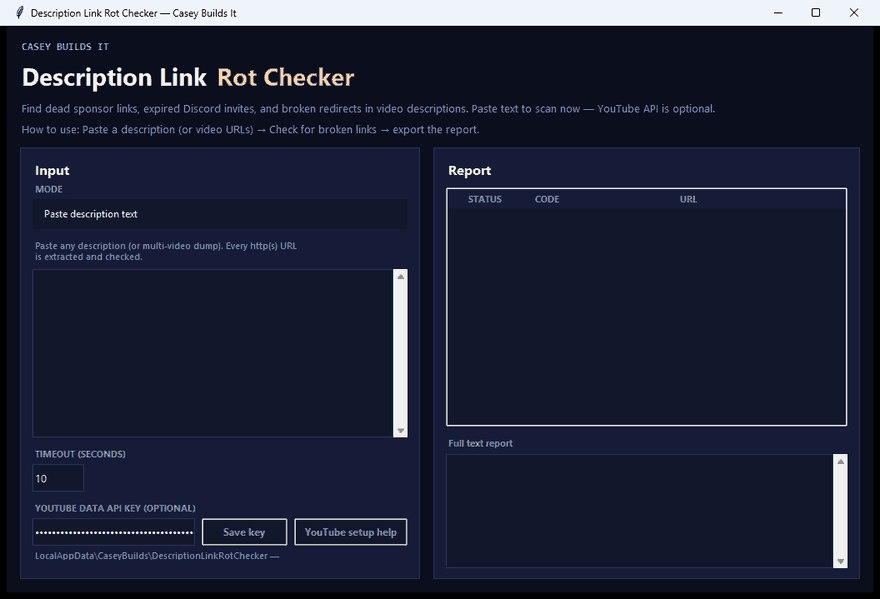
Every creator has old videos still pulling in views while the links sitting in the description quietly die underneath them. Dead social links, expired merch pages, broken Discord invites — it's called link rot, and it's silently costing you money, community growth, and credibility with new viewers who click and hit a dead end. If you haven't audited your old descriptions lately, you're leaving engagement on the table without even knowing it.
In this build, I walk through a tool I made to fix exactly this problem: a description link rot checker.
What the Tool Does
You paste in your video description text, set a timeout, and hit check links. The tool scans every URL in that text and gives you a full report showing how many links it checked, how many are working, and how many are broken or redirecting. No coding knowledge needed — it's a simple desktop GUI you just open and use.
Once you spot the broken links, you copy the report, jump into your video manager, swap out the dead URLs, and you're done in seconds.
Why Link Rot Matters
Old videos keep working for you long after you've stopped thinking about them — that's the whole point of evergreen content. But every dead link in an old description chips away at trust. A new viewer clicking through to a broken merch page or an expired Discord invite doesn't think "oh well," they think "this channel doesn't care." Multiply that across dozens or hundreds of older videos and you've got a real credibility problem hiding in plain sight.
How the Build Works
This was built in Cursor using a clean Python script. The logic is straightforward: extract every URL from a block of text, send a request to each one, and log the response. Working links pass. Broken or redirecting links get flagged in the report. Wrapping that logic in a basic desktop GUI means you don't need to touch the code at all to use it — just paste, set your timeout, and run the check.
Because it's a simple, well-structured script, it's also easy to extend. Want it to export a CSV automatically? Want it to scan an entire channel's playlist instead of one description at a time? Those are reasonable next steps if you want to take the build further.
Key Takeaways
- Link rot quietly damages older videos that are still generating views
- A simple checker can scan an entire description and flag dead or redirecting links in one pass
- No coding knowledge required — it runs as a basic desktop GUI
- The underlying script is simple enough to customize for CSV exports or channel-wide scans
Clean descriptions build trust. Broken links quietly erode it. Auditing your old videos is a small task that pays off every time someone new clicks through.
Subscribe for more creator tools and AI-assisted builds every week.