
Stop Guessing What Any Website Is Built With (FREE Python Tool)
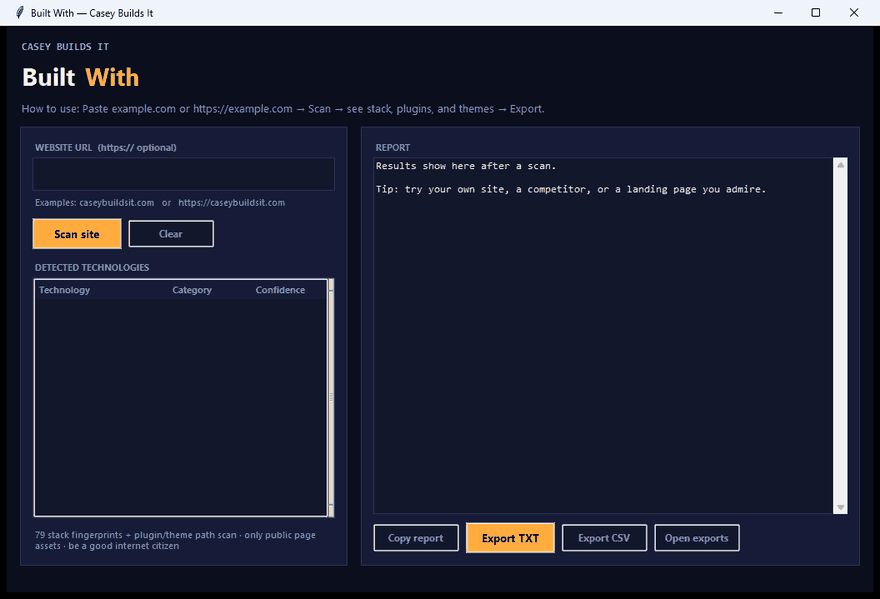
Ever land on a slick website and immediately wonder what's actually running it? What CMS, what theme, what plugins are stitched together to make it work? Most lookup tools out there want a subscription or cap you off after three free searches. So I built my own — a free, local, Python desktop app that scans any public website and tells you exactly what's under the hood in seconds.
What This Tool Actually Does
Drop in any website URL, hit scan, and the tool gets to work fetching headers, parsing the DOM, and extracting every underlying asset it can find. It's built to identify the CMS powering a site, active plugins, parent and child themes, and other pieces of the tech stack — all pulled from public asset paths and response headers.
In the walkthrough, I run it live against WordPress.org as a test case. The scanner correctly pulls back the CMS, flags active plugins like Gutenberg, and identifies both the parent and child theme in use. No guessing, no manual view-source digging.
Why This Matters
Whether you're doing competitor research, scoping out a client's existing site before a redesign, or just curious how a site was put together, having this info instantly saves a ton of time. Most tools that offer this either lock the good data behind a paywall or send your searches off to some third-party server. This one doesn't do either.
How the Build Works
Under the hood, this is a straightforward Python app using standard requests and deterministic fingerprinting — no API keys, no subscriptions, and nothing ever leaves your machine. Everything runs locally, so your lookups stay private.
Once a scan finishes, you land on a full results panel with built-in export options. You can copy the report straight to your clipboard, export it as a clean TXT file, or export to CSV if you want to drop it into a spreadsheet for deeper analysis.
I built the whole thing in Cursor AI, and I walk through the logic step by step — how the scanner fetches data, how it parses and matches known fingerprints, and how the results get organized into the export panel. Whether you want to use the tool as-is or customize it for your own workflow, the build process is laid out so you can follow along and adapt it.
Key Takeaways
- Scans any public website for CMS, theme, and plugin info
- Runs entirely locally — no data leaves your machine
- No API keys, no subscriptions, no search limits
- Export results as clipboard copy, TXT, or CSV
- Built in Cursor AI using standard requests and deterministic fingerprinting
Follow Along for More Builds
If this gave you a new tool for your toolkit or saved you some digging, stick around — there's more where this came from. Subscribe to keep up with future builds, and drop a comment with the next site you want to see scanned.