
How to Track Your Speedrun Splits Perfectly
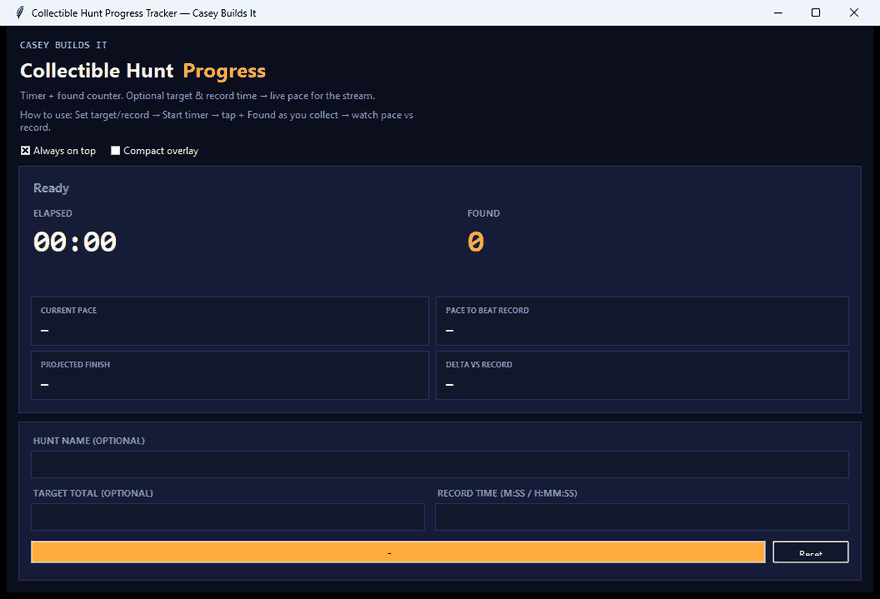
If you've ever watched a speedrunner or collectible hunter try to do mental math mid-run — counting items, guessing elapsed time, trying to figure out if they're even close to the record — you know how painful that is to watch. It's worse when you're the one running it. This build fixes that with a live pace tracker that does the math for you, in real time, so you always know exactly where you stand.
What the Tool Does
This is a pace tracking tool built specifically for speedruns and collectible hunts. Instead of guessing your progress or losing focus doing math in your head, the tracker keeps a live report on screen for the entire run. It shows your current pace, how many items or stars you've found, elapsed time, and — most importantly — whether you're currently ahead or behind the record you're chasing.
Why It Matters
Speedrunning and collectible hunting are all about margins. A few seconds lost here or there can be the difference between a new personal best and a run that falls just short. The problem is that most runners are stuck estimating pace on the fly, which pulls focus away from actually running and adds room for error. Having accurate, live pace data removes the guesswork entirely, so every decision you make mid-run is based on real numbers instead of a gut feeling.
How the Build Works
The tracker is straightforward to use. You start by entering the hunt name and your target record time. Once you hit start, the clock begins live tracking automatically.
From there, every time you grab a collectible or hit a checkpoint, you tap the "plus found" button. The report panel instantly updates with:
- Total stars or items found
- Elapsed time
- Current pace per minute
- The exact pace needed to beat the record
It also tells you flat out whether you're ahead or behind pace, so you can adjust your speed in real time instead of waiting until the run is over to find out you were too slow. When the run wraps up, you can reset the tracker for another attempt or export a full session snapshot to keep a record of your data.
Built with Cursor AI
This is a Python desktop app built in Cursor using Cursor AI. The build breakdown walks through how the tool was put together, including the logic behind the pace calculations and how the report panel updates live as you play. The idea is to show not just the finished tool, but the actual process of building it, so you can see how the pieces come together.
Key Takeaways
- Live pace tracking removes the need for mental math during runs
- Instantly see if you're ahead or behind your target record
- Tracks stars/items found, elapsed time, and required pace automatically
- Export a full session snapshot when your run is complete
- Built in Cursor using Cursor AI as a Python desktop app
If you're into builds like this — tools made for real use cases, built out in the open — follow along for more. Every build breaks down the thinking, the process, and the problem it's solving, so you can learn the approach and apply it to your own projects.