
Tool that tells you which game to play
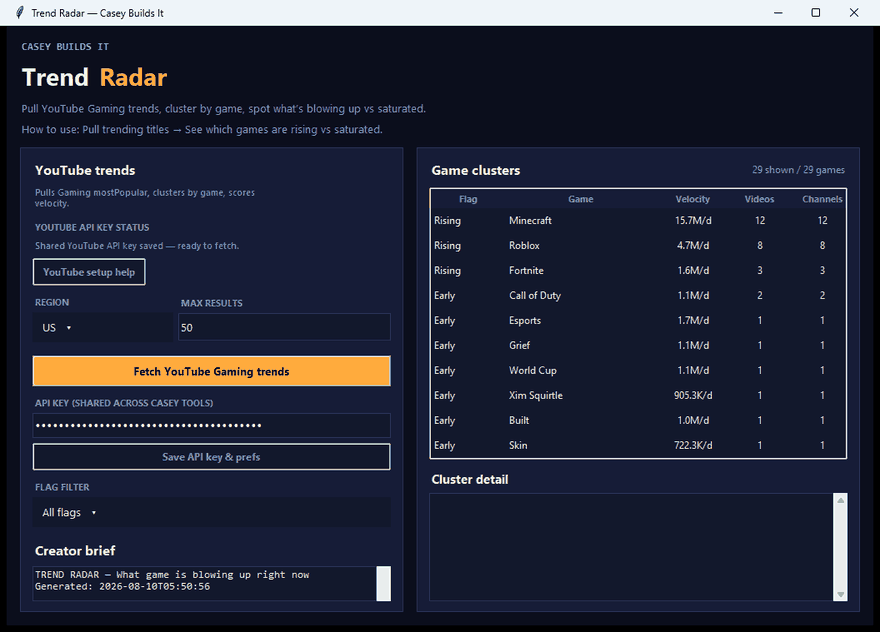
If you have ever published a gaming video only to check analytics and realize the trend already died, you already know the problem: by the time a game "feels" hot, the algorithm has usually moved on. This build is aimed straight at that gap. It is a real-time gaming trend tracker that tells you which games are worth your time today, not last week, so you can plan content around actual data instead of a gut feeling.
What This Tool Actually Does
In plain terms, you give the tool two inputs: a region and a max results number. From there, it pulls live YouTube gaming trend data directly from the API. Instead of just dumping a list of trending videos, it clusters everything by game name and calculates a velocity score based on view growth relative to how long each video has been live.
That velocity score is the key piece. It is what separates a game that is genuinely exploding right now from one that just has a lot of old views piled up.
Why This Matters for Creators
Most creators are reacting to trends after they peak. You see a game blowing up, you rush to edit something, and by the time it publishes, the wave has already crested and a hundred other creators got there first. This tool flips that timing problem by surfacing three categories at once:
- Games that are exploding right now
- Games that are just starting to bubble up, before the crowd notices
- Games that are already oversaturated, so you know to skip them
That third category matters just as much as the first two. Knowing what to avoid saves just as much time as knowing what to chase.
How the Build Works
This is a free Python desktop app, built entirely in Cursor using Cursor AI. The core logic is straightforward: fetch trending gaming data, group it by game, run the velocity calculation, then output a clean ranked list. From there, a one-click CSV export lets you drop the results straight into a content calendar or share them with a team.
Because it was built in Cursor, the underlying prompt is fully reusable. You can open it up in Cursor or any AI coding tool and extend it however you want, whether that is adding more API filters, tracking additional regions, or pulling specific channel lists instead of general trends.
Key Takeaways
- Tracks live YouTube gaming trends by region
- Calculates a real velocity score, not just raw view counts
- Flags exploding, emerging, and oversaturated games separately
- Outputs a ranked list with one-click CSV export
- Built in Cursor AI, fully customizable from the original prompt
If you are done guessing which games to cover and want to plan content around what is actually moving, this is the kind of radar that saves hours of wasted editing. Follow along for more tool builds, AI automation projects, and behind-the-scenes coding sessions using Cursor AI.