
I Broke Every Rule at The Waterpark — Then Built This Safety Kit
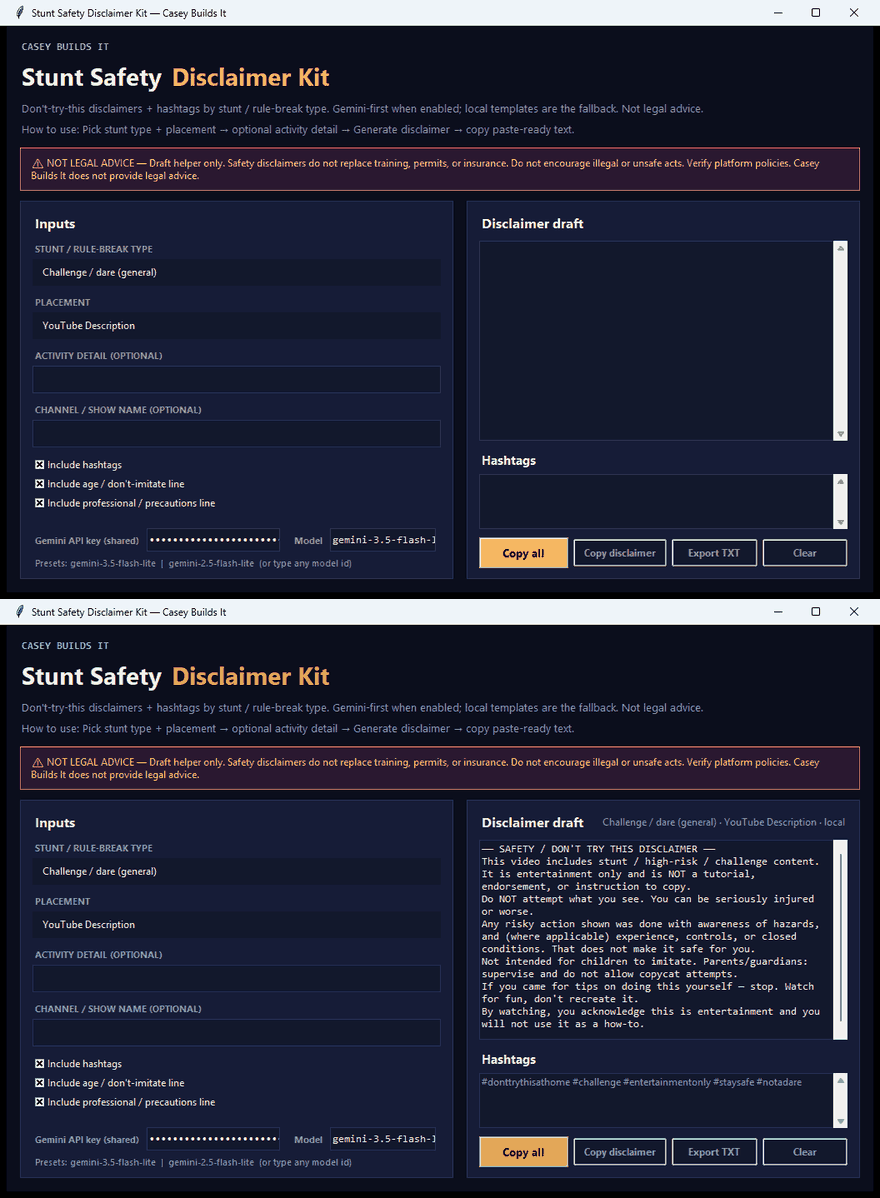
If you make stunt, challenge, or high-risk content, you already know the drill: one sloppy or missing safety disclaimer and you're rolling the dice on a strike, demonetization, or a reviewer flagging your entire channel. After watching too many creators get squeezed for pushing boundaries without proper guardrails, I decided to stop scrambling every upload and build a permanent fix instead.
What the Stunt Safety Disclaimer Kit Does
This is a lightweight Python desktop utility that generates bulletproof, creator-specific safety disclaimers in seconds. You feed it a few simple inputs — your channel name, the type of stunt or rule-break content you're filming, and where the disclaimer needs to live (like your YouTube description). Hit generate, and it outputs a complete, professional safety block covering everything from "don't attempt this" language to copycat warnings, entertainment-only disclaimers, and guardian supervision notices.
From there, you can copy it, export it as a TXT file, or drop it straight into your publishing workflow. It also integrates with Gemini AI to polish and vary the wording so you're not reusing the exact same block on every video, without losing any of the core legal protection baked into the template.
Why This Matters for Creators
This isn't about slowing down your creative process. It's about protecting your channel every time you push boundaries with DIY gear, outdoor challenges, or high-energy stunts. No more digging through old templates, second-guessing your wording, or hoping your disclaimer covers your bases. You generate it once, per video, in seconds, and move on.
How the Build Works
The entire app was built using Cursor AI, and the best part is you don't need to write or understand code to use it. It runs locally on your computer, so you can generate a disclaimer any time you need one, right before you publish.
Because it's a real, working build, the underlying prompt structure is also flexible. If you want to customize the templates, add new content categories, or tweak the tone and legal language, you can take the build prompt into Cursor or any AI tool you prefer and adjust it to fit exactly how your channel operates.
Key Features
- Generates creator-specific safety disclaimers in seconds
- Covers "don't attempt this," copycat warnings, entertainment-only, and guardian supervision language
- Export as TXT or copy directly into your description or workflow
- Gemini AI integration for wording variation without losing legal coverage
- Runs locally as a simple Python desktop app
- Fully customizable build prompt for adding categories or adjusting templates
If you're building bold content, your safety language should be just as solid as your production. Subscribe for more real builds like this one, where I turn everyday creator problems into tools you can actually use.