
Export every YouTube URL from a channel (use this Cursor AI tool FREE)
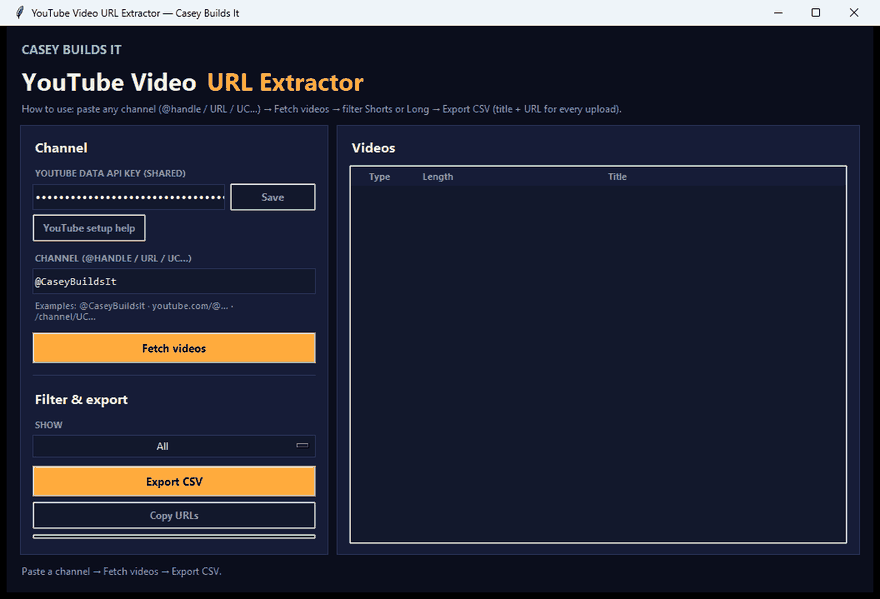
If you have ever tried to get a full list of your own YouTube videos, you already know the pain. YouTube Studio makes you click through pages one at a time, and there is no clean way to just grab every video URL, title, and upload date in one shot. So I built a tool that does exactly that, and in this build I walk through how it works and how it came together.
What the Tool Does
You enter your YouTube API key and your channel handle, hit the fetch videos button, and the tool instantly pulls every video on the channel. No exceptions, no pagination, no manual clicking. It grabs shorts and long form videos alike, along with the video type, URL, upload date, and title for each one.
Once the list loads, you can filter it down to shorts only, long form only, or view the entire channel at once. From there you can copy the URLs directly or export everything to a CSV file.
Why It Matters
Having your full video list in one place opens up a lot of workflows that are otherwise a pain to do manually:
- Running a full content audit on your channel
- Finding old videos worth repurposing
- Building a spreadsheet to track performance or planning
- Feeding the data into another tool or workflow
Instead of digging through YouTube Studio, you get a clean, exportable list in seconds.
How the Build Works
This tool was built entirely using Cursor AI. In the video, I walk through the exact prompt I used to build it, so you can either build the same tool yourself or tweak the prompt to fit your own needs.
It runs as a simple Python tool on your computer, and it works right out of the box. You do not need any coding experience to use it. If you can copy a prompt into an AI tool and follow basic setup steps, you can get this running.
Key Takeaways
- Pulls every video from a channel, shorts and long form included
- Exports titles, URLs, upload dates, and video type
- Filter by shorts, long form, or everything
- Export to CSV for audits, repurposing, or other workflows
- Built with Cursor AI, runs locally as a Python tool
- No coding experience required
This is exactly the kind of practical build I like sharing: something simple that solves a real workflow problem. If you want to follow along as I build more tools like this, subscribe and keep checking in for the next one.