
Are your series thumbnails a mess? (check with this FREE Pyhton tool built in Cursor AI)
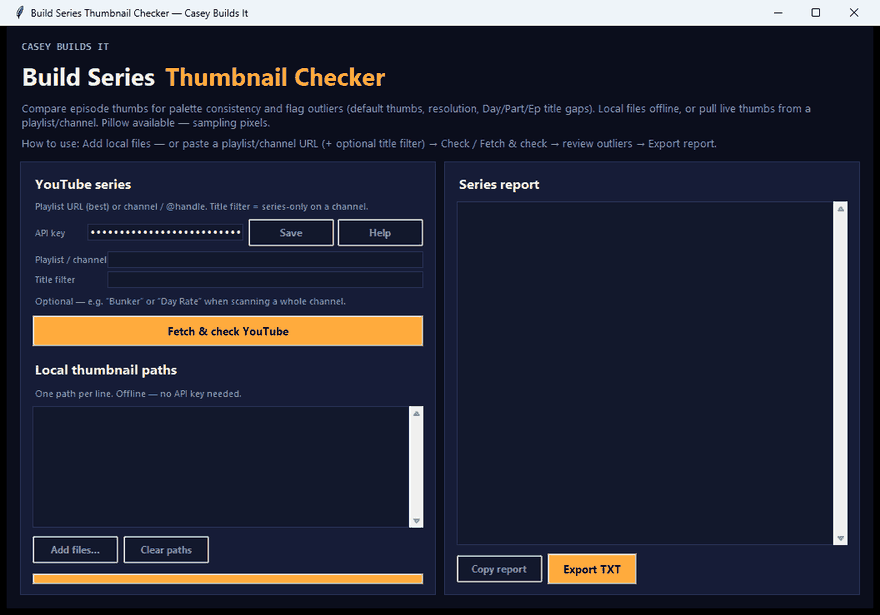
If your series has been visually consistent for three or four episodes straight and then one thumbnail suddenly breaks the pattern, your viewers will notice before you do. A neon-bright thumbnail next to a run of matching bunker-style episodes, an upload that still has the default YouTube frame, a missing day marker, a wrong aspect ratio... these are the silent series killers. This build fixes that with a free tool that finds every one of those problems automatically, before the next episode goes live.
What the Tool Does
You either drop in local thumbnail files or paste a playlist or channel URL, with an option to filter by a series keyword like "bunker" so it only scans the episodes that actually belong together. From there, the tool compares brightness, saturation, file size, and aspect ratio across the whole set, and flags anything that falls outside the series median.
It also catches the little things that are easy to miss manually:
- Default YouTube thumbnails that slipped through unedited
- Titles missing a consistent marker, like "Day 5"
- Aspect ratio mismatches across episodes
- Outlier brightness or saturation compared to the rest of the series
Once the scan runs, you get a full outlier report that you can copy or export straight to a text file.
Why This Matters for a Series
Consistency is what makes a series feel like a series. Viewers scanning a channel page or a playlist pick up on visual patterns fast, and one mismatched thumbnail can make an otherwise solid episode look like it doesn't belong. Catching that before publish is a lot cheaper than catching it after the views come in lower than expected.
How the Build Works
Local files work completely offline, no API key required. If you want to pull thumbnails live from a playlist or channel instead of working from local files, you'll need a YouTube Data API key. That key gets saved once and reused across every Casey Builds It tool, so it's a one-time setup.
This is a small Python desktop app, built in Cursor AI. The whole thing is designed to be practical rather than flashy: point it at a series, let it compare the set, and read the outlier report. You can run it as-is, or take the underlying prompt and adapt it yourself in Cursor or whatever AI tool you're using.
Key Takeaways
- Scans local thumbnail files or a playlist/channel URL
- Filters by series keyword to isolate the episodes that matter
- Flags brightness, saturation, file size, and aspect ratio outliers
- Catches leftover default YouTube thumbnails
- Detects missing title markers like consistent day numbers
- Exportable outlier report for quick review
- Runs fully offline with local files, no API key needed
Run this on your own series before your next upload and see what it catches. If there's a build you want to see next, drop it in the comments. Keep the series recognizable, fix the outliers early, and follow along for the next build.